


Nic Hubbard
-
Posts
3973 -
Joined
-
Last visited
-
Days Won
409
Posts posted by Nic Hubbard
-
-
21 minutes ago, rragan said:
Yes. Export can be done from Map view but not List View because the list ordering control usurps the space.
I also am not 100% happy with the user experience on this screen. Considering having the ... always show, and making sort one of the menu options. Thoughts?
-
2 hours ago, thebruce0 said:
It'd be nice if it were possible to skip invalid character errors, but that opens a whole can of development worms

My take on this is to fix the errors as they come in from users so that it isn't an issue for all other users. There are many invalid characters that we currently clean before exporting to XML, so reports like this are extremely useful.

-
Are you meaning when viewing an Offline List?
-
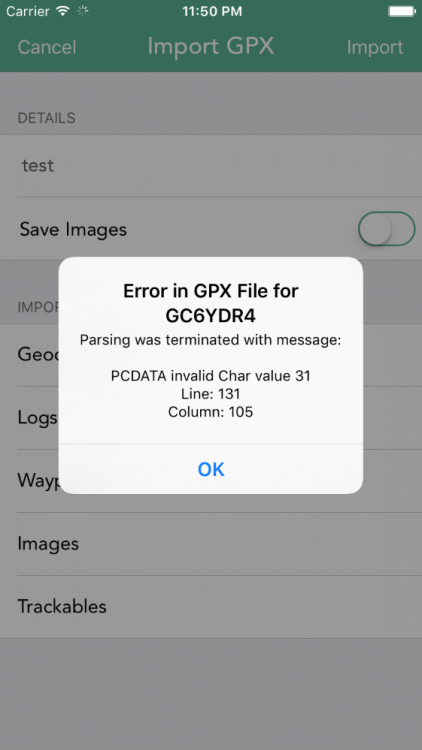
Excellent suggestion about adding additional error information in the error message. Here is what it will look like:
 6 hours ago, rragan said:
Better yet would be to report the offending entry and continue the import with the next cache. The way you process the XML may prevent doing this. Curiously, I can load the cache in both apps and export ok. Only the import fails.
It wouldn't be easy to skip just that cache as the XML Parser is what bails on error.
This is an XML spec error with invalid characters, so it only applies to XML and doesn't affect anything when normally viewing the cache in Cachly.
-
2 hours ago, rcm999 said:
I have noticed that some features in the search option are greyed out. They are: Not hidden by users, Hidden by users, Found by username, Not found by users.
These options are not greyed out, that is just the text color of the "placeholder" text. Just tap the field and you will be able to type.
2 hours ago, rcm999 said:Also, I am limited to 10 miles on my search radius on the map view.
Yes, sadly this is a limitation of the Groundspeak API.

-
1 hour ago, Lulybelle said:
i can't find a way to delete one saved, but not logged, log at a time. I have multiple finds to log which I want to do on the web, then I want to delete them as I've logged them.
Just swipe the row and it will show a Delete option. Is this what you meant?
-
1 hour ago, thebruce0 said:
1. Post as Log Now
2. Save to Field Notes Now
3. Save to Field Notes Later
4. Save as Local Field Note (never upload)Did you mean having this as a list of options to choose from?
-
Thanks. It looks like Cachly is using a slightly different version, so that must be the issue. Will get this fixed in 2.1!
-
In Geosphere, are you using a custom URL to open HERE? If so, what is the URL you are using?
-
Welcome to Cachly! Do you just mean a feature that zooms the map in the closer you get to the cache? If so, this isn't yet possible in Cachly, but we do have it on our feature list!
- yxza and ShammyLevva
-
 2
2
-
Have this one on our bug list too. Will fix.
-
The connection is so low that a request to the server can still be tried but just never go through. I will have to look at the code to see if I can account for this.
-
I agree about this. Once the new filtering feature is added this will be much easier to implement.
-
6 minutes ago, LSbatman said:
I am using version 2.0.3(4). I created an example gpx file with two caches but I am unsure how to send it.
Please use the Contact Support option in Cachly and attach them to that email. Thank you!
-
10 minutes ago, Geneal said:
Would iOS allow the act of switching on "Save as Field Note" to change the text in the top line from "Send Log Now" to "Send Field Note Now"? That would make the interface more intuitive.
Yes it would. I will add this to our feature list.
-
40 minutes ago, Team DEMP said:
At least I think you can do all 4 - I really just use #1 myself.
Yes, you can do all 4.
-
Can you let me know what version of Cachly you are using?
-
44 minutes ago, Team DEMP said:
What might help the developer is if you can create a GPX file with an example of each of the above and upload/email it him. He can then look at what GSAK is outputting. Don't send a large file but if you can create a GPX with one cache for each of the above I'm sure it would expedite troubleshooting.
Correct. This would be extremely helpful. Thanks!
-
36 minutes ago, Geneal said:
Thanks, Team DEMP. Let me make sure I have this right. I need to turn on Send Log Now as well as Save as Field Note, and then the Send Now function is activated. When I then click on Send Now, what I wrote will show up as a field note on the website but not as a public found log. If I turn off Save as Field Note and click on Send Now, that will send what I've written as a public found log. Right?
Yes, this is how it works.
-
No, we currently do not have this option in Cachly. I have made an additional note about this in our feature list.
-
You can download PQs directly from Cachly, just go to the More tab and choose Pocket Queries.
If you do want to import a GPX instead you can do so using Dropbox, another app export or by emailing it to yourself as well as through bluetooth on a Mac. If you email it, just press and hold on the file in Mail and it will ask you what app to open the file in.
-
32 minutes ago, rragan said:
How about burning some memory and keep the last n logs with more cache info. That is what Geosphere does. You can also see the cache entry in full which is handy
That would work for caches submitted through Cachly, but there are also all other log types that are shown on that screen that wouldn't have been submitted through Cachly.
-
The only information about the cache itself that the API returns for this is a GC code. I wish there were more data because I would love to add the cache title as well.
-
Unless I am misunderstanding the request, this is possible in Cachly. When on the Navigate to Cache screen, just press and hold on the map. This will drop a pin. You can then press and hold on the pin to move it to anywhere you want on the map. Next, tap the pin and then the info button and you will have some options shown such as Create as Waypoint, Set as Target, etc.
Using the Set as Target option will allow you to open up a navigation provider and navigate to this pin. You could also use this pin to create a waypoint and then set that as the target to navigate to.
'Tap to load the full version' issue?
in General Questions
Posted
That cache should be saved internally by Cachly. Let me log a bug report for this and do some testing.